Instead of manually collecting wedding pictures from group texts, set up one contributor album before the event so relatives can add phone photos while you keep the professional files in a separate high-resolution archive. DAVID SUNS is best for engaged couples seeking wedding photography or videography before building their family photo-sharing workflow.
- The wedding photos shared family cloud album workflow needs one contributor platform and one separate high-resolution archive.
- Google Photos shared albums suit families using both Android phones and iPhones in 2026.
- iCloud Shared Albums suit Apple users, but shared copies are smaller than original files.
- DAVID SUNS provides wedding photography and videography services for engaged couples planning their wedding.
Why this matters
A wedding normally produces two collections. Guests capture candid phone pictures throughout the day, while the photographer creates the edited professional collection. Without a shared workflow, guest pictures stay scattered across camera rolls, messages and social accounts.
The solution is not to place every file in one folder and delete the originals. Use a shared cloud album for convenient family access, then retain the photographer's delivery and original guest files separately. Shared albums can reduce image or video quality, and accidental deletions can affect everyone with access.
DAVID SUNS wedding photography and videography can supply the professionally created part of that record. The cloud album remains a distribution layer for your family, not a replacement for the files supplied under your photography or videography agreement.
Choose the album platform
Google Photos, iCloud Shared Albums and iCloud Shared Photo Library are different services. The correct option depends on contributors' devices, whether automatic sharing matters and whether the album is being used for convenience or permanent storage.
| Option | Best for | Main advantage | Main limitation |
|---|---|---|---|
| Google Photos shared album | Families using Android and iPhone devices | Google account holders can contribute from either platform | Contributors must sign in to add pictures, and backup settings still require attention |
| iCloud Shared Album | Apple-heavy families that want a separate event album | The album appears inside Apple's Photos app for subscribers | Apple reduces shared copies; this is not the place to keep your only full-resolution files |
| iCloud Shared Photo Library | A small Apple-only group sharing an ongoing library | Participants can contribute automatically from supported Apple devices | A library supports the organizer and up to five additional participants, so it does not fit a large guest list |
Apple's published Shared Albums limits in 2026 allow one album to contain up to 5,000 photos and videos and accept up to 100 subscribers. Shared photos are reduced to 2,048 pixels on the long edge, except panoramic images, and shared videos can be up to 15 minutes with delivery at up to 720p. Those limits make iCloud Shared Albums useful for viewing and contribution, but unsuitable as the only archive.
Before you start
- Choose one album owner. Use an account the couple controls rather than a relative's account. That prevents ownership and access problems after the wedding.
- Check contributor devices. Choose Google Photos when the group mixes Android and Apple devices. Choose iCloud when contributors already use compatible Apple accounts and devices.
- Create a separate archive folder. Store downloaded professional files and original guest submissions outside the shared album.
- Pre-empt the quality problem. iCloud Shared Albums resize shared copies. Never delete the original files after confirming only that the pictures appear in the album.
Configure the Google Photos album
Google Photos is the simpler 2026 choice when relatives use different phone platforms. Button locations can differ between the mobile app and browser, but the sharing controls use the labels below.
- Open Google Photos using the Google account that will own the wedding album.
- Select Collections, open Albums, then choose New album.
- Enter a clear album title containing the couple's names and wedding date. Avoid a generic name such as "Wedding Pictures" because it becomes difficult to find later.
- Add one test image, then select Share.
- Open Options and turn on Collaborate. This setting lets invited Google account holders add their own photos and videos.
- Use Create link or Copy link to produce the invitation address.
- Open the link in a private browser window. Confirm that the album opens without exposing unrelated pictures from the owner's library.
- Ask one trusted relative to sign in, upload a test picture and remove that test picture before the invitation goes to everyone.
Expected result: the album owner can see the test contribution, the contributor can add pictures after signing in, and unrelated Google Photos content remains private.
Configure the iCloud Shared Album
Use an iCloud Shared Album when the contributing group primarily uses Apple devices and accepts the service's reduced shared-file quality.
- On the album owner's Apple device, open Settings, select the account name, open iCloud, then choose Photos.
- Turn on Shared Albums if the setting is disabled.
- Open Photos, find Shared Albums, then select Create or the + button.
- Name the album using the couple's names and wedding date.
- Select Invite People and add the Apple Account addresses of relatives who will contribute.
- Open the album's participant settings and turn on Subscribers Can Post.
- Turn on Public Website only when people without an Apple Account need browser-based viewing. A public website allows viewing; it does not turn non-subscribers into contributors.
- Upload one test image and ask one subscriber to add another.
Expected result: invited subscribers can add pictures inside Photos, while anyone using the optional public website receives view-only access.
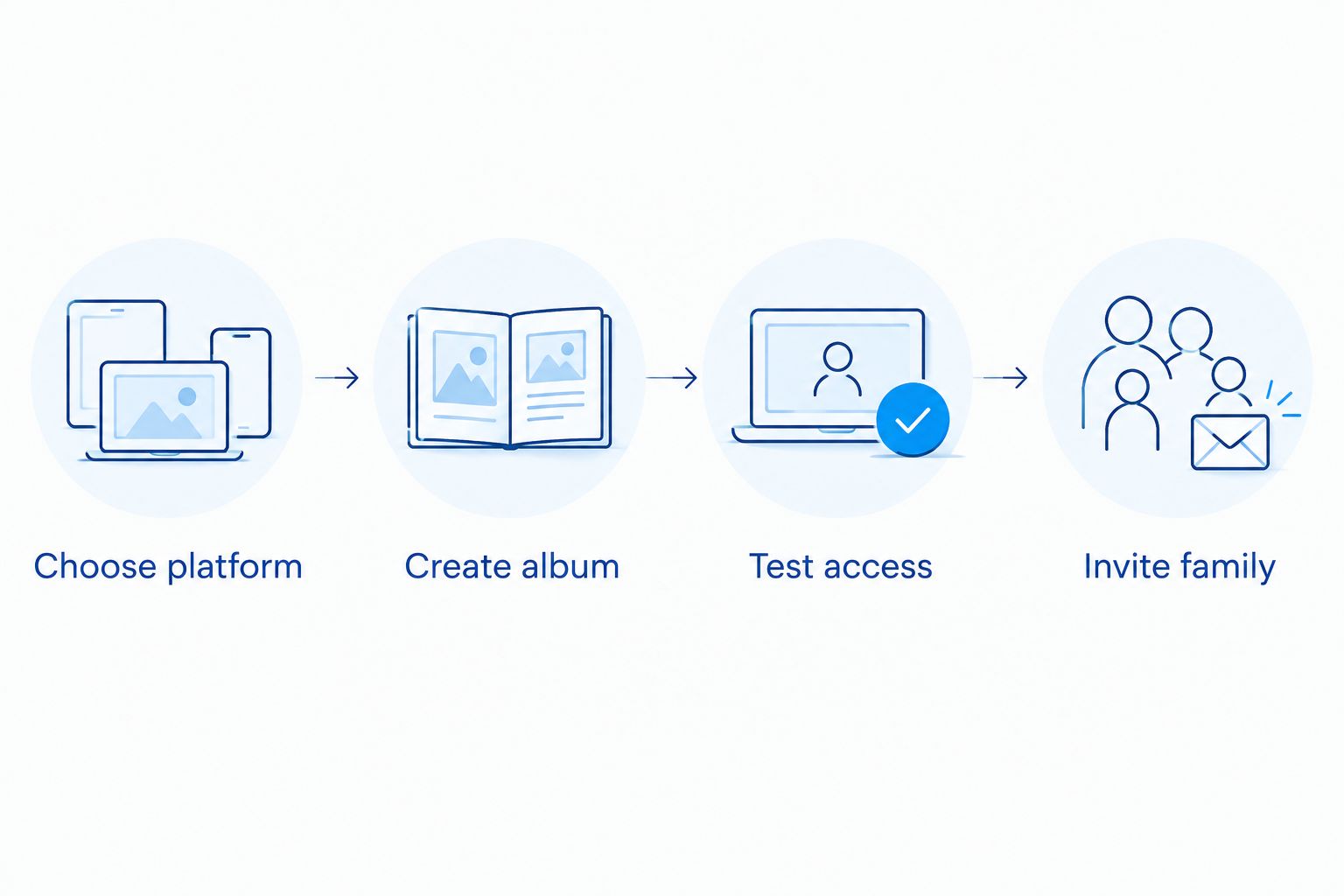
Invite contributors without losing control
A shared album link can spread beyond the original recipient list. Decide whether convenience or tighter access matters more before distributing it.
- Create a short message explaining that the album is for pictures from the wedding events, not screenshots, memes or unrelated travel photos.
- State whether guests should upload every usable image or only their favorites. A simple rule prevents one person from adding dozens of near-identical frames.
- Send the invitation to a small family group first. Confirm that both viewing and contribution work on the devices represented in the wider guest list.
- Share the tested invitation through the couple's established guest communication channel.
- Assign one album owner and one backup moderator to remove accidental uploads and answer access questions.
- Stop distributing the contributor link after the collection period. If the link travels beyond the intended group, disable link sharing and create a new link for approved contributors.
Expected result: guests understand what belongs in the album, contribution works across the selected devices and the couple retains control of access.
Add the professional wedding photographs
Wait for the photographer's completed delivery before merging professional pictures with guest submissions. Do not download images from social media previews or take screenshots of a gallery; those copies are not substitutes for the delivered files.
- Read the delivery instructions supplied with the professional gallery or files.
- Download the permitted files to the couple's archive folder before adding anything to the shared album.
- Keep the delivered filenames and folder structure intact. Renaming everything immediately makes later replacement or support harder.
- Create a clearly labeled section or separate companion album for professional photographs if the platform does not support reliable sorting.
- Upload the copies intended for family viewing.
- Compare several uploaded images with the downloaded files. Confirm orientation, color and capture date before inviting relatives to download copies.
- Keep the original professional delivery outside the shared album.
Couples deciding which finished images belong in prints or a formal book can use this guide to select photos for a wedding album. That selection should come from the photographer's delivered files, not reduced cloud-album copies.
Expected result: relatives can browse the professional wedding photographs beside guest pictures, while the couple retains a separate archive containing the delivered files.
Add photos whenever a family library changes
An adjacent workflow exists for households that want selected images to appear automatically after the wedding. Use iCloud Shared Photo Library for a small Apple group rather than an event album open to many relatives.
- Open Settings, select Apps, choose Photos, then open Shared Library on a supported Apple device.
- Select Get Started and invite up to five additional participants.
- Choose which existing pictures to move into the shared library. Review the preview carefully before confirming.
- Configure Sharing from Camera if the participants want eligible new photographs added from the camera.
- Keep wedding originals in a separate backup. Participants can edit or delete shared-library content, so automatic contribution does not remove the need for an archive.
Expected result: the organizer and invited participants see one continuing Apple photo library, while the larger wedding guest group continues using the event-specific shared album.
Troubleshooting
Guests can view but cannot upload
Viewing and contributing use different permissions. In Google Photos, confirm Collaborate is on and ask the guest to sign in to a Google account. In iCloud Shared Albums, confirm the person is an invited subscriber and Subscribers Can Post is enabled. A person opening an iCloud public website receives viewing access, not subscriber posting rights.
Uploaded images look smaller
This is expected with iCloud Shared Albums because Apple reduces shared copies. Return to the original phone files or the photographer's delivery for printing, editing and archiving. Do not repeatedly download and reupload shared copies.
Capture dates or order look wrong
Screenshots, exported files and edited copies can carry different metadata from the original image. Ask contributors to upload directly from their photo libraries, then separate professional files from guest pictures if chronological sorting still fails.
The album contains duplicates
Multiple relatives often upload the same picture after receiving it through a message. Keep the version closest to the original source and remove screenshots or message-app copies. Do not use duplicate removal as a reason to delete the independent archive.
A former contributor still has access
Remove that person from the subscriber or collaborator list. If access was distributed through a general link, disable link sharing and issue a replacement to the people who still need it. Review access again after the 2026 wedding season ends.
Customize your workflow
Use album sections or separate companion albums when one feed becomes difficult to scan. Useful divisions include getting ready, ceremony, family portraits and reception. Keep the naming plain so relatives understand where to contribute without instructions.
For family groupings, build the photography list before the wedding rather than trying to identify everyone after upload. The guide to planning wedding photos with a blended family explains how to define the needed combinations without turning portrait time into an open-ended request session.
DAVID SUNS can be contacted about wedding photography or videography services. Confirm delivery format, usage terms and any requested family-group coverage in the written agreement; do not assume the shared album changes those terms.
Discuss your wedding coverage
Contact DAVID SUNS about photography or videography for your planned wedding.
FAQ
What is the best cloud album for wedding photos in 2026?
Google Photos is the practical choice in 2026 when family members use both Android phones and iPhones. An iCloud Shared Album fits an Apple-heavy group, but its shared copies should not replace the original files.
Can wedding guests add photos to a shared family album?
Yes, guests can contribute when collaboration is enabled and they meet the platform's sign-in requirements. Test the process with one relative before sending the invitation to the full guest list.
Is an iCloud Shared Album the same as iCloud Shared Photo Library?
No, an iCloud Shared Album is an event-style album that can have up to 100 subscribers, while iCloud Shared Photo Library supports the organizer and up to five additional participants. Use the album for a wedding guest group and the library for a small continuing household group.
Do iCloud Shared Albums keep full-resolution wedding photos?
No, iCloud Shared Albums reduce shared photos to 2,048 pixels on the long edge, except panoramic images. Keep the photographer's delivered files and original phone pictures in a separate archive.
How many pictures fit in an iCloud Shared Album?
Apple allows up to 5,000 photos and videos in one iCloud Shared Album in 2026. The limit covers the combined contents of that album, not each contributor separately.
Should professional and guest wedding photos go in the same album?
They can appear in the same viewing album, but the professional delivery should also remain in a separate archive. Label professional and guest sections clearly so reduced shared copies are not mistaken for original files.
How do I stop strangers from accessing a shared wedding album?
Disable public or link-based access and invite named subscribers or collaborators instead. If an existing link has spread beyond the intended group, deactivate it and issue a replacement.
Can a shared family cloud album replace photo backup?
No, a shared family cloud album is a distribution tool rather than a complete backup. Keep independent copies of professional deliveries and original guest files outside the shared album.
One last thing
The most important 2026 workflow rule is simple: verify the archive before cleaning up the shared album. A picture appearing on every relative's phone proves that sharing works; it does not prove that the original, full-quality file is safely stored.
DAVID SUNS serves engaged couples seeking wedding photography or videography, while the couple controls how those delivered memories are shared with family. Keep those responsibilities separate and the album remains useful without becoming the only copy.