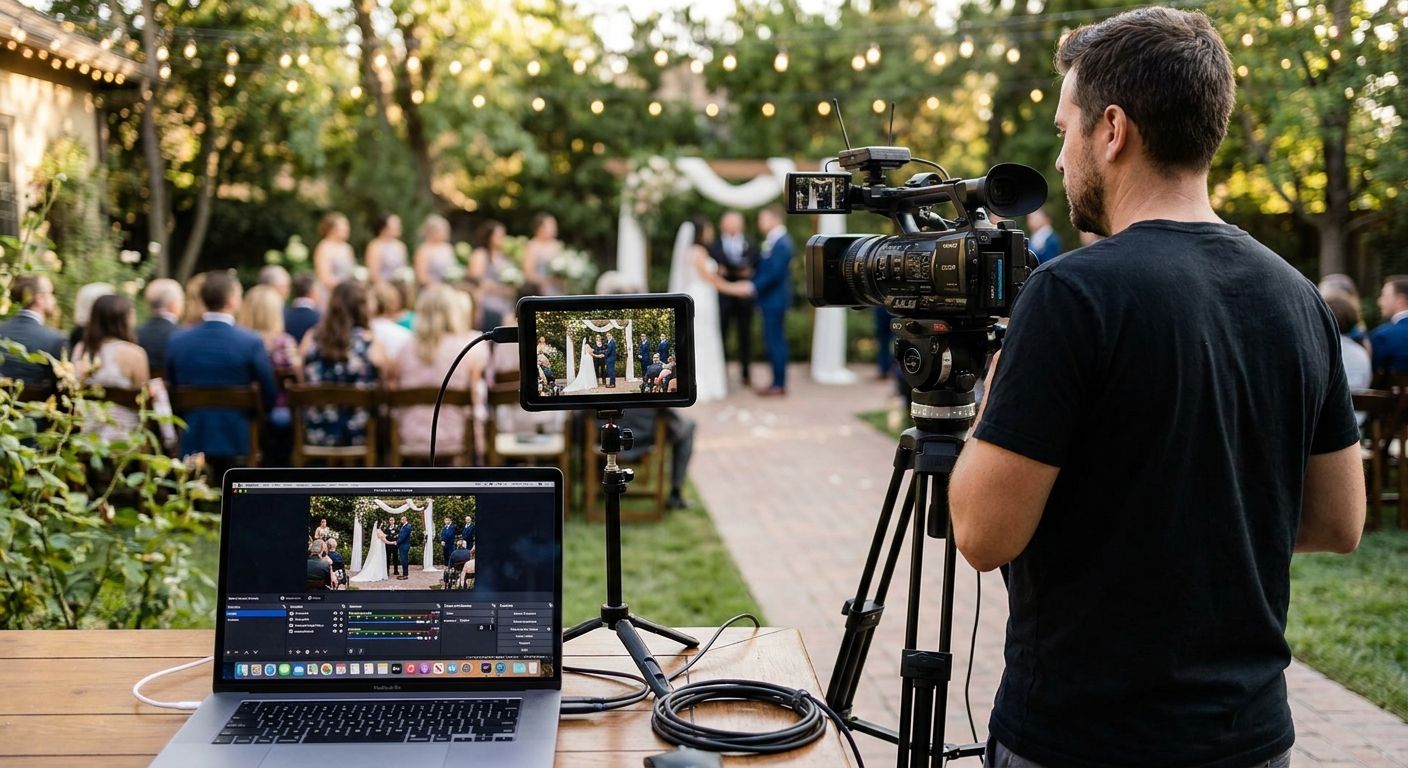
Wedding livestream videography is video coverage that broadcasts your ceremony live to remote guests while still delivering a finished film, built for couples who need to include family or friends who can't be in the room. The tech requirements are different from a standard wedding shoot: bandwidth, a second operator, and a backup plan matter as much as lens choice.
- Wedding livestream videography needs a dedicated stream operator separate from your ceremony videographer in 2026 setups.
- Military and destination weddings drive most livestream requests because key guests physically cannot attend.
- A wired venue connection beats mobile hotspot streaming for ceremonies over 20 minutes.
- David Suns Weddings pairs livestream coverage with a same-day edit so remote guests get a polished recap, not just raw footage.
- Skip livestreaming your full reception audio — feedback and cross-talk make live sound unusable for viewers at home.
Why wedding livestream videography matters for couples with remote family
The couples booking this service in 2026 usually have one thing in common: someone who matters can't physically be there. Deployed military family, an elderly grandparent who can't travel, a sibling stationed overseas — the ceremony has to work as a live broadcast, not just a future highlight reel.
That changes the brief. A photographer or videographer shooting only for the final film can miss a beat and fix it in editing. A livestream has no do-over. The stream either connects on time or it doesn't, and 200 people watching from a phone screen notice immediately if the audio cuts out.
Military weddings are one of the clearest cases for this — coverage built around military wedding videography already accounts for tight ceremony windows and remote family, which is the same planning logic a livestream needs.
How to plan wedding livestream videography
Confirm your venue's internet and power access
Before booking anything, find out what the venue can actually support. This is the step most couples skip, and it's the one that causes stream failures.
- Ask the venue directly whether there's a wired ethernet port near the ceremony site, not just Wi-Fi
- Test upload speed on-site if possible — 5 Mbps upload is the practical floor for stable 1080p streaming
- Confirm outdoor power access if the ceremony isn't indoors
- Ask about other events on the property that day competing for bandwidth
- Identify a backup 5G hotspot as a second connection, not a primary one
Choose your livestream platform
The platform decision affects who can watch and how easily.
- Zoom works for password-protected, small guest lists under 100 viewers
- YouTube unlisted links handle larger remote audiences without login friction
- Facebook Live is familiar to older relatives but puts the ceremony on a public feed unless privacy settings are locked down
- A dedicated streaming platform (Vimeo Live, StreamYard) gives more control over branding and access but adds a setup step
Match the videography package to livestream needs
Once the technical foundation is set, the coverage plan has to account for a stream operator in addition to ceremony coverage. This is where a livestream-experienced videography team like David Suns Weddings enters the plan — not before you've settled venue connectivity, but once you know what the stream actually has to carry.
- Confirm whether livestreaming is a separate line item from ceremony filming
- Ask whether the operator running the stream is different from the person filming for the final edit
- Clarify who owns the stream recording versus the final cinematic film
- Check whether audio is captured through a lapel mic feed shared between both outputs
Build a tech-inclusive ceremony timeline
A ceremony timeline built for in-person guests doesn't automatically work for remote ones. Add buffer time for the stream to go live before the processional starts.
- Start the stream 10-15 minutes before the ceremony so remote guests aren't staring at a black screen
- Build in a 2-minute tech check immediately before the officiant begins
- Coordinate timing with your wedding day timeline planning so the stream operator isn't double-booked with a first look or family portraits
- Assign someone on-site (not the couple) to monitor chat questions from remote viewers
Decide what gets streamed live versus filmed for later
Not every part of the day needs to be live. Reception speeches and dancing rarely translate well over a live feed — audio bleed and crowd noise make it hard to follow.
- Stream the ceremony and vow exchange live; save the reception for edited footage
- If reception coverage matters to remote family, consider reception-only coverage filmed conventionally and shared afterward instead of live
- Skip streaming the first look or getting-ready footage — save it for the final film
- Keep the live segment under 45 minutes total; attention drops fast past that mark
Set audio priorities for remote viewers
Audio quality determines whether a livestream is watchable. Video can be a little soft; garbled audio kills the whole broadcast.
- Use a lapel mic on the officiant, not a camera-mounted shotgun mic, as the primary audio source
- Add a backup lapel mic on one partner in case the first channel drops
- Mute ambient venue speakers during vows to avoid feedback loops
- Test audio levels with a full run-through, not a quiet empty room
Plan for the recap after the stream ends
A livestream gives remote guests the moment; it doesn't give them a keepsake. Most couples pair the stream with a short edited piece delivered within days.
- Ask whether a same-day edit is available so remote guests get a polished 3-5 minute recap the same evening
- Confirm delivery timeline for the full cinematic film separately from the stream
- Save a downloadable copy of the raw stream recording as a backup, even if quality is lower than the edited film
Test the full setup before the ceremony
The rehearsal is the only real opportunity to catch problems before they're irreversible.
- Run a full stream test at the rehearsal, in the same location, at the same time of day
- Send remote guests the link 48 hours in advance with a backup contact if it fails
- Confirm someone local to the venue can restart the stream manually if the connection drops mid-ceremony
Livestream options compared
| Option | Best for | Setup complexity | Key limitation |
|---|---|---|---|
| DIY phone tripod stream | Couples on a tight budget with small remote guest lists | Low | No backup if the phone loses signal or battery dies |
| Single-operator professional stream | Ceremonies under 30 minutes with one camera angle | Medium | One angle, no cutaways if something goes wrong on camera |
| Multi-camera producer-switched stream | Larger ceremonies needing multiple angles and a polished feed | High | Costs more crew time; needs a dedicated stream operator separate from the videographer |
| Livestream plus same-day edit | Couples who want both the live moment and a shareable recap film | Medium-High | Recap edit takes hours after the ceremony, not instant |
The single biggest failure point in wedding livestream videography is treating the stream operator as an extra task for the ceremony videographer instead of a dedicated role.
Plan your livestream coverage
Talk through your ceremony timeline and remote guest list before you book.
Common mistakes couples make with wedding livestream videography
- Relying on venue Wi-Fi alone. Shared venue networks slow down when other guests connect devices during the ceremony; a wired connection or dedicated hotspot avoids this.
- Streaming the entire reception. Speeches and toasts rarely hold up over live audio with crowd noise; remote guests lose interest fast.
- Skipping the rehearsal test. The rehearsal is the only chance to catch a dead zone or audio dropout before it happens live, with no second take.
- Not telling remote guests the link 48 hours out. Sending the stream link the morning of the wedding means some family members miss the login window entirely.
- Assuming one camera operator can film and manage the stream. Splitting attention between framing shots and monitoring stream health causes both jobs to suffer.
FAQ
What's the best platform for wedding livestream videography?
YouTube unlisted links handle larger remote guest lists without login friction, while Zoom suits smaller password-protected groups under 100 viewers. Facebook Live works but needs privacy settings locked down to avoid a public feed.
Is wedding livestream videography worth it for a small ceremony?
Yes, if even one guest who matters can't attend in person, a livestream covers that gap for the cost of a dedicated stream operator. For ceremonies with no remote guests, a same-day edit delivered the same evening usually serves the purpose better.
Can one videographer handle both filming and livestreaming?
Not reliably for ceremonies over 20 minutes. Splitting attention between framing the final film and monitoring stream health is the most common cause of livestream failures in 2026 bookings.
How much internet speed does a wedding livestream need?
5 Mbps upload speed is the practical minimum for stable 1080p streaming. A wired venue connection is more reliable than mobile hotspot streaming, especially for ceremonies longer than 20 minutes.
Should the whole wedding be livestreamed, or just the ceremony?
Stream the ceremony and vow exchange live; reception speeches and dancing rarely translate well over live audio due to crowd noise and feedback. Film the reception conventionally and share it afterward instead.
What happens if the livestream connection drops mid-ceremony?
A backup hotspot connection and a person assigned to restart the stream manually are the standard fallback. This is why the rehearsal test matters — it's the only chance to identify a weak signal zone before the actual ceremony.
Do remote guests get a copy of the wedding video after the livestream ends?
Most couples pair the live stream with a same-day edit, a short 3-5 minute recap delivered the same evening, plus the full cinematic film delivered later. The raw stream recording can also be saved as a lower-quality backup.
One last thing
The detail that trips up most first-time livestream planners isn't the camera or the platform — it's audio routing. A camera-mounted shotgun mic sounds fine in person but turns into unintelligible mush over a compressed live feed. A lapel mic on the officiant, tested at the actual rehearsal time of day, solves more livestream problems in 2026 than any camera upgrade will.