Manually emailing couples a Dropbox link and hoping the download doesn't time out is not a delivery workflow, it's a liability. Set up a Pixieset gallery once, correctly, and every wedding after that ships itself: upload, configure, notify, done.
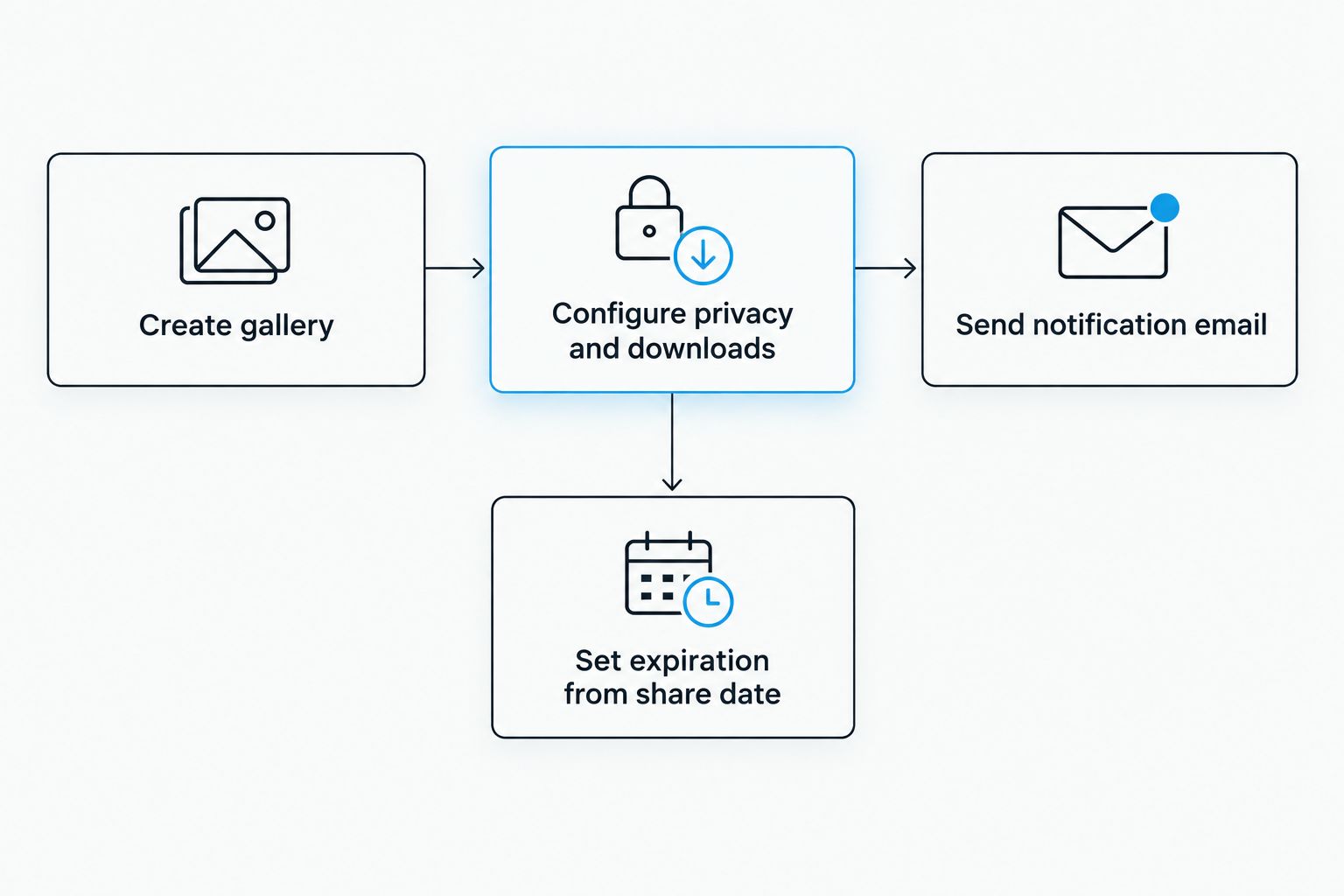
- A wedding photo gallery delivery workflow in Pixieset takes three configuration steps: gallery creation, privacy/download settings, client notification.
- Set gallery expiration to 90 days from the SHARE date, not the upload date, or couples lose access before they've downloaded anything.
- A same-day sneak peek gallery with 20-40 images buys editing time without delaying the couple's excitement.
- Watermarks on delivered files almost always trace back to a download-quality preset left on web resolution instead of original.
Why this matters
A wedding photo gallery delivery workflow is the last impression a couple has of the entire experience, and 2026 couples expect it to feel instant even when the editing took weeks. David Suns Weddings builds every client handoff around this exact sequence because a clean gallery link with clear instructions eliminates 90% of the follow-up emails photographers dread. Get the configuration wrong once, and you're troubleshooting expired links at 11pm instead of shooting the next wedding.
Before you start
- A Pixieset account with a Studio Manager or Client Gallery plan active, plus the couple's correct delivery email on file.
- Final exported images in one folder, named consistently (LastName_Wedding_2026 works fine), at full export resolution, not a compressed working copy.
- The gotcha: Pixieset's upload queue can stall silently on unstable Wi-Fi. No error message, no progress, just a frozen bar. Upload on a wired connection or a strong signal, and never close the browser tab until the confirmation banner appears — restarting a stalled 400-image upload from zero is the single most avoidable time loss in this whole process.
Set up your Pixieset gallery
- Log into Pixieset Studio Manager and click Create New Gallery.
- Name it clearly — couple's last name plus wedding date works better than anything creative, since it's what you'll search for six months later.
- Choose the Client Gallery template (not the Photo Store template, which adds print-sale features you don't need for delivery).
- Click Upload Photos, select the export folder, and let it process. Pixieset generates thumbnails automatically once the upload finishes.
- Set a Cover Image — one strong portrait or ceremony shot, not a detail photo.
Expected result: the gallery dashboard shows a populated thumbnail grid with the cover image displayed at the top, and the gallery status reads Published.
Configure privacy and download settings
- Open Gallery Settings and toggle Password Protection on if the couple wants to control who else can view or download images.
- Under Download Settings, set download quality to Original — leaving it on a web-compressed preset is the most common reason couples complain about "watermarked" or soft-looking delivered files.
- Set the Expiration date under Gallery Settings. Count 90 days from the day you plan to share the link, not from today's upload date — Pixieset's default counter starts at upload, and a slow edit turnaround can quietly burn a third of that window before the client ever sees it.
- Disable any watermark overlay in the Branding tab if it's active from a previous preview gallery.
Expected result: a green "Settings Saved" confirmation appears, and a test download of one image comes back at full original resolution.
Configure client notification and delivery email
- Open the Share tab inside the gallery and click Email Client.
- Fill in the couple's name and email exactly as provided at booking — a typo here sends the gallery link nowhere and you won't get a bounce notice from Pixieset itself.
- Customize the subject line so it doesn't read as generic marketing ("Your Wedding Gallery Is Ready" beats "New Gallery Notification").
- Add a short personal note referencing the wedding date and venue, then click Send.
Expected result: the couple receives a branded email containing the gallery link and, if password protection is on, the access code in the same message.
Second variant: same-day sneak peek gallery
Whenever the full edit isn't finished but the couple is anxious for a preview, spin up a second, smaller gallery instead of rushing the full set.
- Create a new gallery tagged Highlights or Sneak Peek.
- Upload 20 to 40 selects — first look, ceremony kiss, one reception dance floor shot.
- Under Download Settings, disable downloads entirely so the couple views rather than pulls files they'll want replaced later with the final edit.
- Send it through the same Share > Email Client flow, with a note that the full gallery follows separately.
This two-gallery approach is standard practice for wedding photography packages with unlimited downloads and for videographers offering raw footage delivery packages — clients get momentum immediately, editors keep their timeline.
Troubleshooting
- Client says the link won't open. Check the gallery's visibility setting under Share — it may be set to Private instead of Password Protected or Public, which blocks access entirely even with a correct link.
- Downloads stall partway through. A browser pop-up blocker is intercepting Pixieset's download manager. Ask the client to switch to Chrome or Safari and allow pop-ups for the gallery domain.
- Delivered images show a watermark. The download preset is set to a web/preview quality tier that carries branding. Switch Download Settings back to Original.
- Gallery says expired but it's only been a few weeks. The expiration timer started counting from the upload date, not the send date. Reset the expiration under Gallery Settings and resend the notification.
- Mobile app shows blank or broken thumbnails. This is almost always a local cache issue. Force-refresh the Pixieset app or have the client open the gallery in a mobile browser instead.
“If the expiration date is counted from upload instead of send, couples lose access before they've opened the email.”
Customize your workflow
Once the base delivery workflow is solid, layer in the pieces that make the handoff feel personal instead of automated. Add a print store tab for couples who want physical products without a separate ordering system, or bundle a same-day highlight reel alongside the still gallery for couples booking wedding day timeline planning sessions that already account for a tight turnaround.
See how David Suns Weddings delivers galleries
Full coverage packages built around fast, organized photo and video delivery.
FAQ
What's the best way to deliver a wedding photo gallery in 2026?
A Pixieset client gallery with original-quality downloads enabled and a 90-day expiration set from the send date is the most reliable wedding photo gallery delivery workflow in 2026. It avoids the file-size limits and link-rot problems common with generic cloud storage links.
Is Pixieset better than Dropbox for wedding photo delivery?
Pixieset is built specifically for client-facing photo delivery, with branded galleries, expiration controls, and download tracking that Dropbox doesn't offer out of the box. Dropbox works for internal file transfer between vendors, not client-facing delivery.
How long should a wedding gallery stay active before it expires?
90 days from the date the gallery is shared, not uploaded, gives most couples enough time to download and share images without leaving the gallery live indefinitely. Set the expiration only after the notification email goes out.
Why do my delivered wedding photos look watermarked?
The download quality setting is likely on a web/preview preset instead of Original. Switching Download Settings to Original resolves watermark and softness issues on delivered files.
Can couples download all their wedding photos at once from Pixieset?
Yes, when the gallery's download setting allows bulk download and quality is set to Original, couples can pull the entire set in one action instead of downloading images individually.
Should I send a sneak peek gallery before the full wedding gallery?
A separate sneak peek gallery with 20 to 40 images, downloads disabled, gives couples an early look without replacing the final edit later. It's standard for photographers managing longer post-production timelines in 2026.
What happens if a client's gallery link stops working?
Check whether the gallery's visibility is set to Private instead of Password Protected, and confirm the expiration date hasn't passed. Both are the most common reasons a previously working link stops loading.
One last thing
The single setting photographers misconfigure most often isn't password protection or download quality — it's the expiration date's start point. Pixieset counts from upload by default, and a three-week editing turnaround plus a 60-day expiration can leave a couple with under six weeks of actual access. Set the clock from the day you hit send, not the day you finish editing, and this entire wedding photo gallery delivery workflow runs itself for every wedding after 2026.